
Use with AI
View this page as MarkdownBest for pulling data out of Politigraph to answer a question or help analyze it, without writing a GraphQL query yourself. AI can help in 2 ways, through llms.txt and MCP.
Have AI Write the GraphQL Query with llms.txt
Section titled “Have AI Write the GraphQL Query with llms.txt”-
Send the llms.txt URL
https://politigraph.wevis.info/llms-full.txtfor AI to read, so it understands the data structure and can help write the query you need.Example prompt
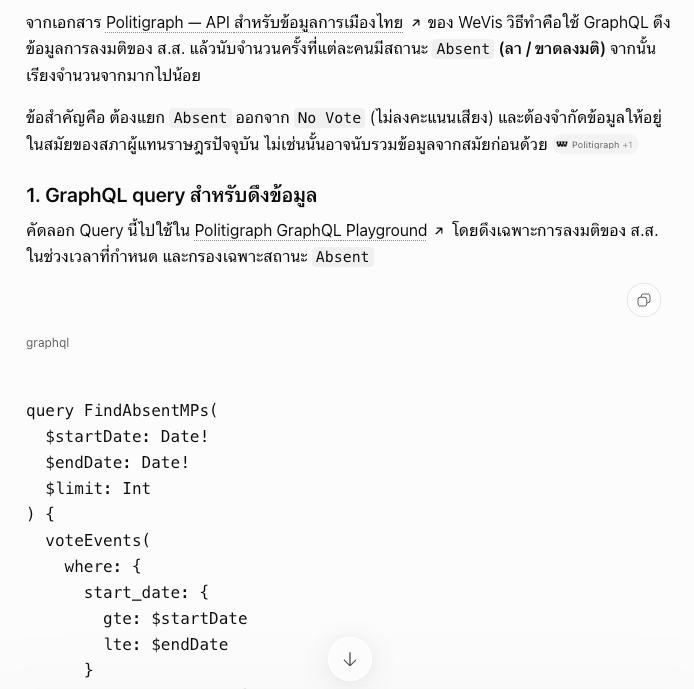
Understand Politigraph from https://politigraph.wevis.info/llms-full.txt, then write a query to find which representative was absent from the most vote events in the current term.
Example answer from ChatGPT
-
Use the query in the GraphQL Playground.
llms.txt is a standard guide file for AI. Politigraph provides the following related files:
/llms.txt: an index of every documentation page, with links/llms-full.txt: the entire documentation plus the full GraphQL schema in a single file/schema.graphql: the complete GraphQL schema (SDL)
You can send the URL https://politigraph.wevis.info/llms-full.txt to give AI everything at once, or https://politigraph.wevis.info/llms.txt to let it pick only the documents relevant to the question, which may reduce token usage but risks AI missing important information or requirements from the documents it didn’t read.
Let AI Fetch the Data Directly Through MCP
Section titled “Let AI Fetch the Data Directly Through MCP”-
If your AI agent supports the Model Context Protocol (MCP), you can connect it to our MCP endpoint at
https://politigraph.wevis.info/mcp. No authentication or API key is required.Example MCP client configuration { "type": "http", "url": "https://politigraph.wevis.info/mcp" } -
Once connected, you can prompt AI to answer questions or help analyze issues from the data.
Example prompt
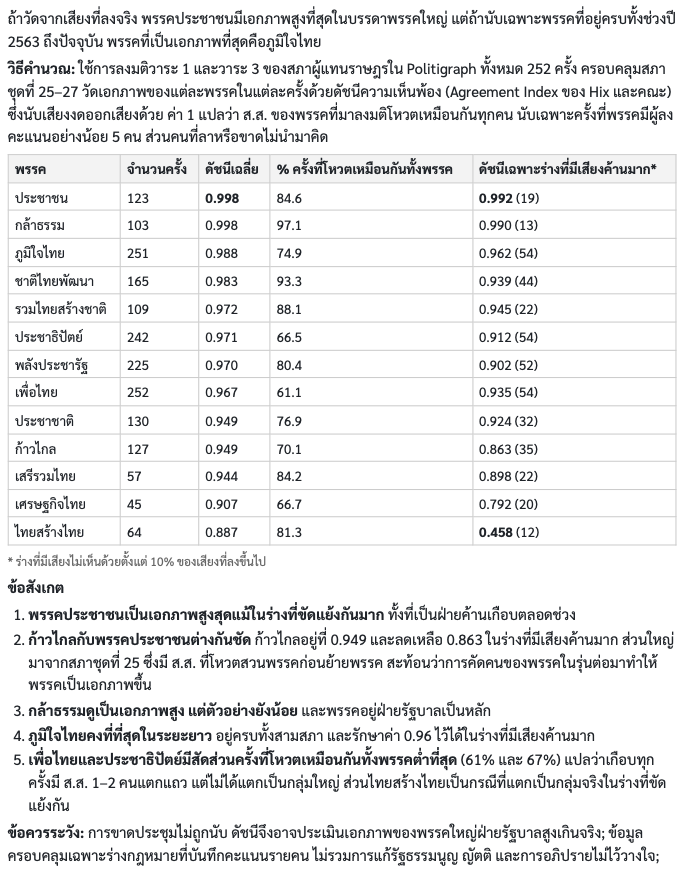
Using Politigraph, find which party has had the most unified voting pattern from 2020 to the present.
Example answer from Claude
Comparing Usage Across AI Providers
Section titled “Comparing Usage Across AI Providers”An AI agent on your machine can read our documentation and send the query itself, so it can answer with real data. A web AI chat can only read the documentation and help you write a query, but you have to run it yourself in the GraphQL Playground. Connect the AI chat to our MCP server if you want it to return real data.
Web AI Chat
Section titled “Web AI Chat”| Provider | llms.txt | MCP server |
|---|---|---|
| ChatGPT | Reads it, drafts queries | Custom connector in developer mode, on paid plans |
| Claude | Reads it, drafts queries | Custom connector on every plan, web and desktop, one connector when on free |
| Gemini | Cannot read the llms.txt URL’s content directly, you must copy the content from https://politigraph.wevis.info/llms-full.txt into the prompt before asking it to write a query |
Custom app in Spark on AI Pro and Ultra, or through an admin on Business |
| Perplexity | Reads it, drafts queries | Custom remote connector, on paid plans |
| Microsoft Copilot | Reads it, drafts queries | Only through an agent you build in Copilot Studio |
Local AI Agents
Section titled “Local AI Agents”| Client | llms.txt | MCP server |
|---|---|---|
| Claude Code | Reads it and runs queries | Yes |
| Codex CLI | Needs network_access = true |
Yes |
| Gemini CLI | Reads it and runs queries | Yes, configured through httpUrl |
| Cursor | Reads it and runs queries | Yes |
| VS Code with GitHub Copilot | Reads it and runs queries | Yes |
Last checked on 7 September 2026